
Once an export exists it is recoverable forever. A dropped connection or a crashed script never means a lost, already-billed export.
Single job
GET  /api/mcp/exports/{job_id}
GET  /api/mcp/exports/{job_id}/download
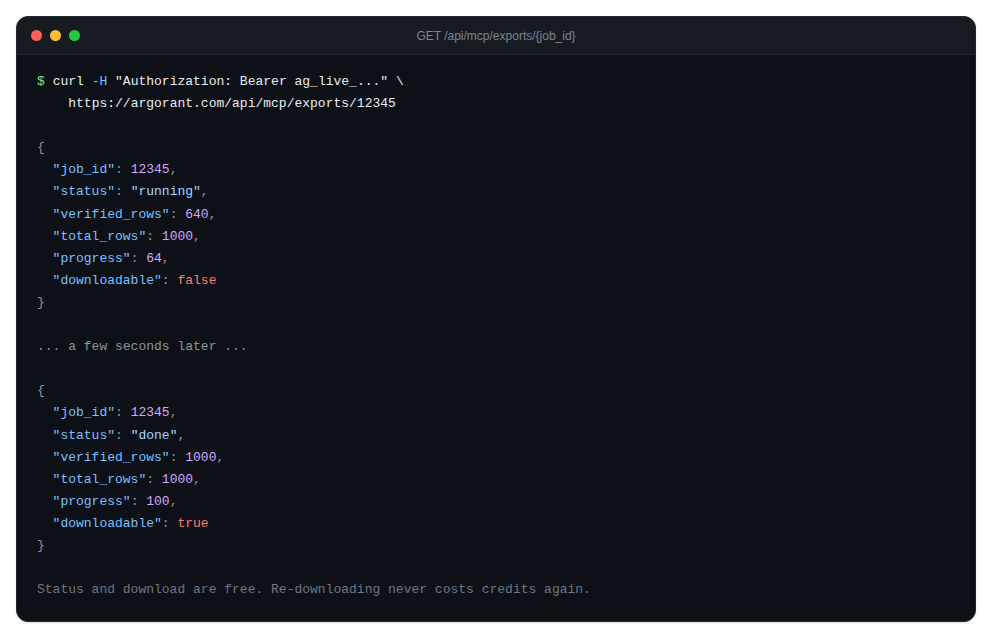
The status response reports the state, verified rows against total rows, a progress percentage and whether the file is downloadable yet. Poll every few seconds; small exports typically finish in a couple of minutes. Prefer the download path the status response gives you over constructing one yourself.
Batches above 50,000 rows
GET /api/mcp/export-batches/{batch_id}A batch reports completed chunks against total chunks and lists each chunk with its own download path. Download them one at a time; the convention in the CLI is one file per chunk, named leads-part1.csv, leads-part2.csv and so on.
The CLI shortcut
npx argorant export status 12345
npx argorant export download 12345 -o leads.csv
npx argorant export status 987 --batch
npx argorant export download 987 --batch -o leads.csv
Status and download are free. Re-downloading an export you already paid for never costs credits again, so recovery is always safe to attempt.
If a job reports a failed state, the response carries an error message. Nothing is billed for rows that were never produced.