
When you connect Claude, ChatGPT, Codex, Cursor or another AI app to Argorant, the app gets a set of 100 tools. Each tool is one action, such as counting people or launching a campaign. This article explains the tools in groups, in plain words, so you know what your AI can do for you, what it costs and where it should stop and ask you.
The short version
- Looking is free. Counts, masked previews, reading your campaigns and reading replies cost no credits.
- Getting contact details costs credits. Reveals, exports, email lookups and adding new people to a campaign spend credits from your account.
- Some tools change things or act in the real world. They save lists, edit campaigns, launch campaigns that send real email, and answer replies. Your AI should always ask you first.
- Argorant checks every call on its side. The AI can never spend more than your balance, and every spend shows up in your account.
The tool groups
Tool names start with argorant_. Your AI app may show them with its own prefix or as plain titles like "Count matching people". You do not need to remember the names. Ask in normal words and the AI picks the tool.
| Group | What it does | Cost | Changes things? |
|---|---|---|---|
| Account and search | Shows who is connected, credits left and today's limits. Counts people by job title, company, industry, place and more. Shows example rows with names hidden, and how many people Argorant has at one company. | Free | No |
| Contact details | Reveals names, work emails and profile links for a small group. Enriches one person or company. Finds the work email of named people at a company, one at a time or up to 1,000 per list. | Credits | Spends credits |
| Lists and exports | Saves a search as a lead list, adds to a list, renames or deletes it. Makes a CSV file of a search or a list, tracks it until it is ready and reads the start of a finished file. | Saving is free, exports cost credits | Yes |
| Checking your own list | Quotes, starts and tracks a check of email addresses you already have. | Half a credit per new address | Spends credits |
| Campaigns | Lists and reads campaigns, creates a draft, writes the emails, follow-ups and personal lines, picks sending mailboxes, adds people, changes settings, launches, pauses, stops or deletes a campaign, and shows its numbers day by day. | Free, except adding new people (1 credit each) | Yes, and a launch sends real email |
| Replies | Reads replies, bounces and unsubscribes in one place, opens a full conversation, answers or forwards it, and sets or manages reply labels. | Free | Yes, an answer is a real email |
| Mailboxes and block list | Lists connected mailboxes and their health, connects Google Workspace or other mailboxes, changes daily limits and warm-up, disconnects a mailbox, and adds or removes addresses and domains on the block list. | Free | Yes |
| New mailboxes and domains | Suggests domain names, quotes new sending mailboxes, orders a quote, shows the order and stops renewal or cancels. | Money, paid by you at checkout | Yes |
| Webhooks and connected tools | Lists, creates, tests and deletes webhooks. Sends the people of a campaign or an export into a sending tool you connected under Settings. | Free | Yes |
ChatGPT and Codex see a shorter list. Tools that order mailboxes and domains, take a mailbox password or push people into another tool are not offered to OpenAI apps. You do those things in the Argorant app instead.
What costs what
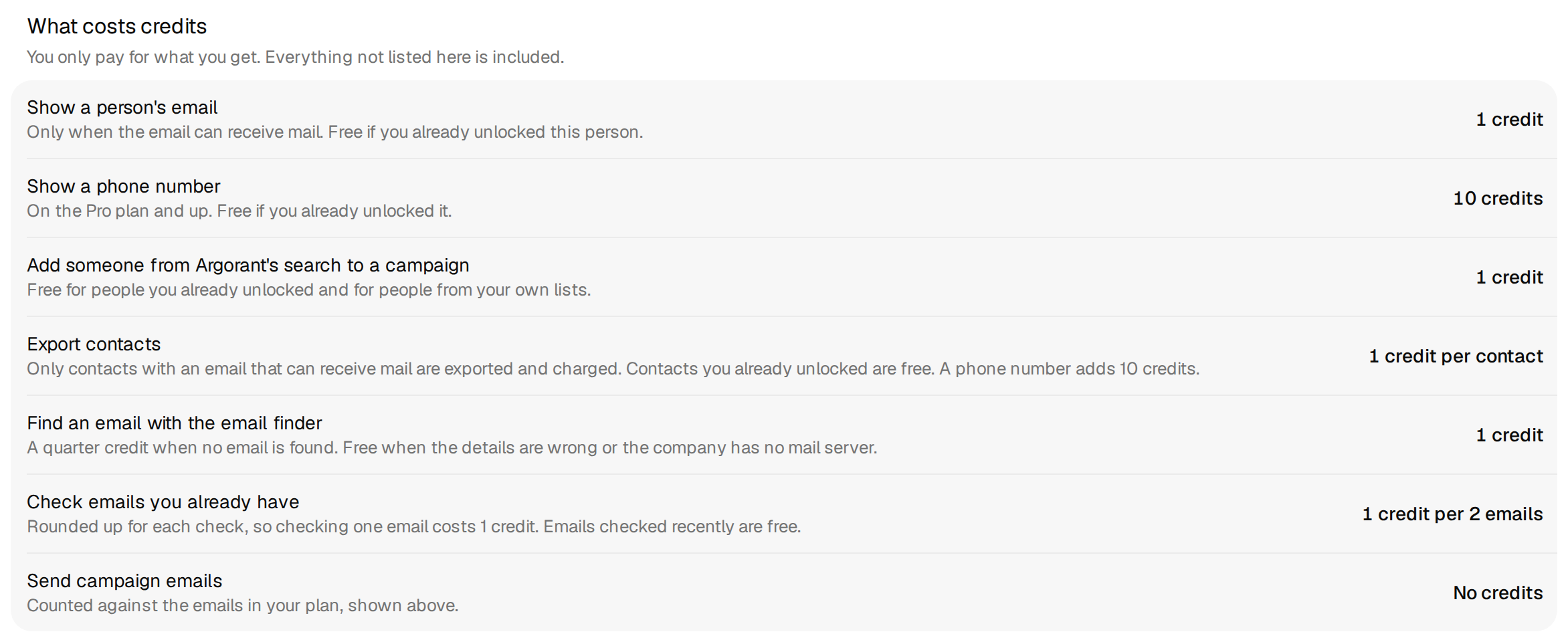
- A reveal costs 1 credit for each person whose working email is new to your account. People you already unlocked are free again, in the app, the API and through your AI.
- An export costs 1 credit for each person with a working email. People you exported before are skipped unless the AI is told to include them.
- Adding people from Argorant to a campaign costs 1 credit for each new person, like a reveal.
- Finding a named person's email costs 1 credit when an email is found, also when the company's domain accepts every address. It costs a quarter credit when nothing is found.
- A person enrichment costs 1 credit when the email is working and new to you. A company enrichment is free.
- Phone numbers are optional. Each phone number returned costs 10 credits, and nothing if none is found.
- Checking addresses you already own costs half a credit per new address. The AI has to pass the most it may spend, and Argorant never charges more than that.
Search, counts and masked previews do not deduct credits. Account permissions and rate limits still apply.
What the permission screen grants
When your AI app connects, Argorant opens its own sign-in and permission screen. It shows the app's name, where access goes, the account you are signed in with, and a list under This connection can. You approve the whole list with Connect Argorant (for apps Argorant can check, such as Claude, ChatGPT and Cursor) or Allow access (for other apps). Cancel stops the connection.
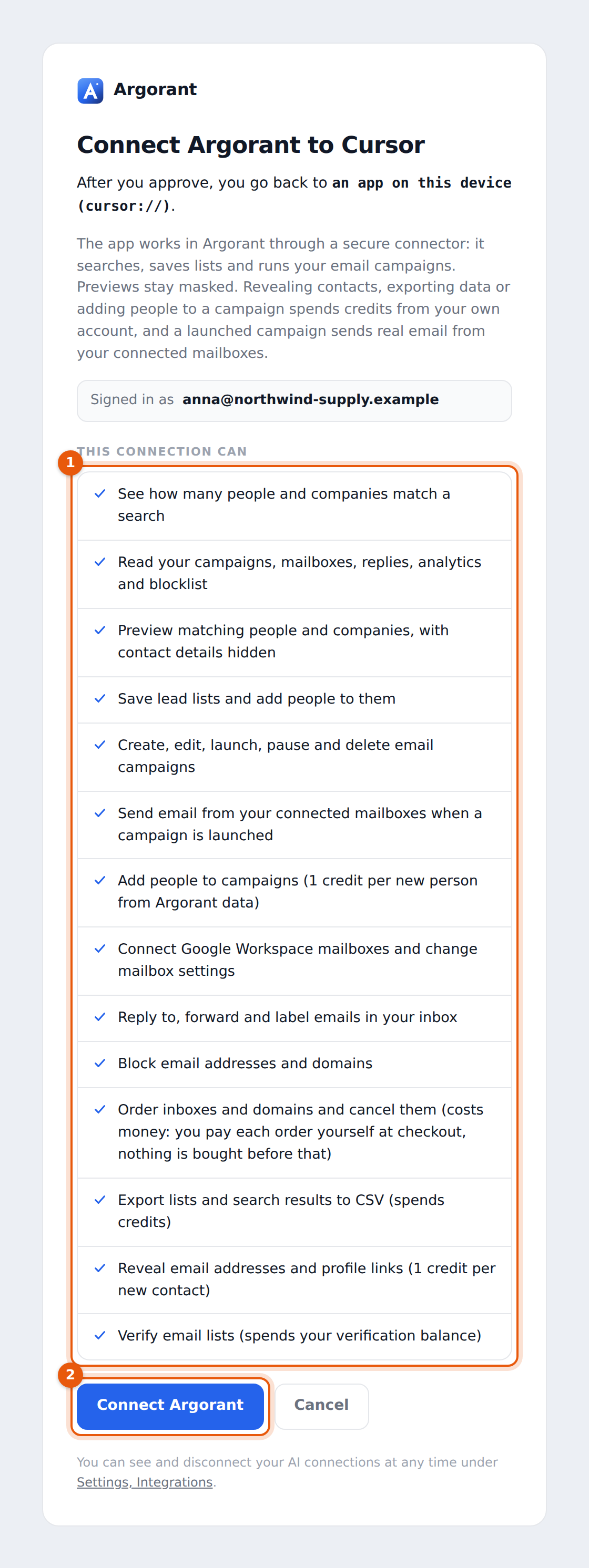
The lines map to the tool groups like this.
| Line on the screen | Tools it opens |
|---|---|
| See how many people and companies match a search. Read your campaigns, mailboxes, replies, analytics and blocklist. | Counts, the account check, reading campaigns, replies, mailboxes, webhooks and the block list |
| Preview matching people and companies, with contact details hidden | Masked previews |
| Save lead lists, run campaigns, send email when a campaign is launched, add people to campaigns, connect mailboxes, reply to and label emails, block addresses, order inboxes and domains | Lists, campaigns, replies, mailboxes, the block list, webhooks and mailbox orders |
| Export lists and search results to CSV (spends credits) | Exports and their status |
| Reveal email addresses and profile links (1 credit per new contact) | Reveals, person enrichment and email finding |
| Verify email lists | Checking addresses you already have |
Two things to know. First, the screen is a promise about what the app may do, not a list of things it will do right away. Nothing is spent or sent at connect time. Second, every connection gets the same full set. If you want an agent that only looks and never spends, say so in its instructions (see the guardrails article) and keep your balance small.
Example prompts and what the AI does
These are typical requests. The tool order is what a well-behaved AI does with Argorant's tool descriptions. Your app may add its own confirmation pop-ups on top.
1. Size a market
How many heads of logistics work at food manufacturers in Germany? Show me five examples.- Calls
argorant_accountto check the connection and your credits. - Calls
argorant_count_peoplewith the job title, the industry and the country. - Calls
argorant_preview_peoplefor five rows with names hidden. - Reports the number and the examples. Nothing was spent, so it does not need to ask.
2. Get contact details for a few people
Get me the work emails of 20 of them.- Repeats the same search so the people match what you saw.
- Stops and asks. It tells you it will reveal up to 20 people at up to 20 credits, fewer if some are already yours.
- After your yes, calls
argorant_reveal_peoplewith a limit of 20 and tells you what was shown and what it cost.
3. A full list as a file
Make a CSV of everyone in that search.- Counts again and tells you how many rows and the most it can cost.
- Stops and asks for your approval of the row count and credits.
- Calls
argorant_create_export. For very large or complex searches it saves a list withargorant_create_listfirst and then callsargorant_export_list. - Checks
argorant_export_statusuntil the file is ready and gives you the link to Exports, where you download it.
4. Build and launch a campaign
Save that search as a list and set up a three-step campaign from my connected mailboxes. Do not launch it yet.- Calls
argorant_create_list(free, shows no contact details). - Calls
argorant_create_campaign, which makes a draft. Nothing is sent from a draft. - Writes the emails with
argorant_set_campaign_emailsand shows them to you. - Calls
argorant_list_inboxesandargorant_set_campaign_sendersto pick the mailboxes. - Stops and asks before
argorant_add_campaign_leads, because new people cost 1 credit each. If the list holds addresses that are not confirmed valid, it asks you which kinds to include and recommends valid only. - Calls
argorant_get_campaignto show anything that still blocks a launch. - Waits. Only when you clearly say launch does it call
argorant_launch_campaign, which starts sending real email. A launch is refused while text like [Name] or TBD is still in an email.
5. Work through replies
Show me this week's interested replies and draft an answer to each.- Calls
argorant_inboxwith the interested folder, thenargorant_inbox_threadfor each conversation. - Shows you each draft answer in the chat.
- Stops and asks. Only after your yes on a specific text does it call
argorant_inbox_reply, which sends it at once from the mailbox that got the reply.
6. Check a list you already have
Check these 800 email addresses before I import them.- Calls
argorant_quote_verificationto get the price. - Stops and asks you to approve the most it may cost (half a credit per new address, so at most 400 credits here).
- Calls
argorant_start_verificationwith that maximum, thenargorant_verification_statusand gives you the link to the results.
Limits that apply to every tool
- Each call runs under your account, your role in the workspace and your balance. An AI cannot do anything you could not do in the app.
- During the trial and without a plan, searches and counts through an AI assistant are limited to 20 a minute and 1,000 counts and 1,000 search rows a day for the whole account. On a plan there is no daily limit, only a speed limit.
- During the trial, each connection can reveal up to 100 people a day. These limits reset at midnight UTC and cost nothing.
Common mistakes
- Thinking "connected" means it works. Ask the AI to check your Argorant account. A real answer with your email and credits is the proof.
- Saying "save them" after a preview and expecting five people. A saved list holds the whole search unless you say "only these five".
- Asking the same export twice. Each request can start a second export. Ask for the status instead.
- Letting an AI loop the single email finder over a long list. For more than five people it should use the list version with a spending limit.
What happens next
Everything the AI makes lands in your Argorant account: lists under Lists, files under Exports, campaigns under Campaigns, replies in the Unibox. You can open and check all of it in the app, and disconnect the AI any time under Settings, AI connections.