
Plans and usage is the one page that tells you what your workspace pays for, how much of it is left this month, and what each action costs. Open it from Settings, then Plans and usage. Check it before a big export or a large campaign, so you know the credits and campaign emails are there.
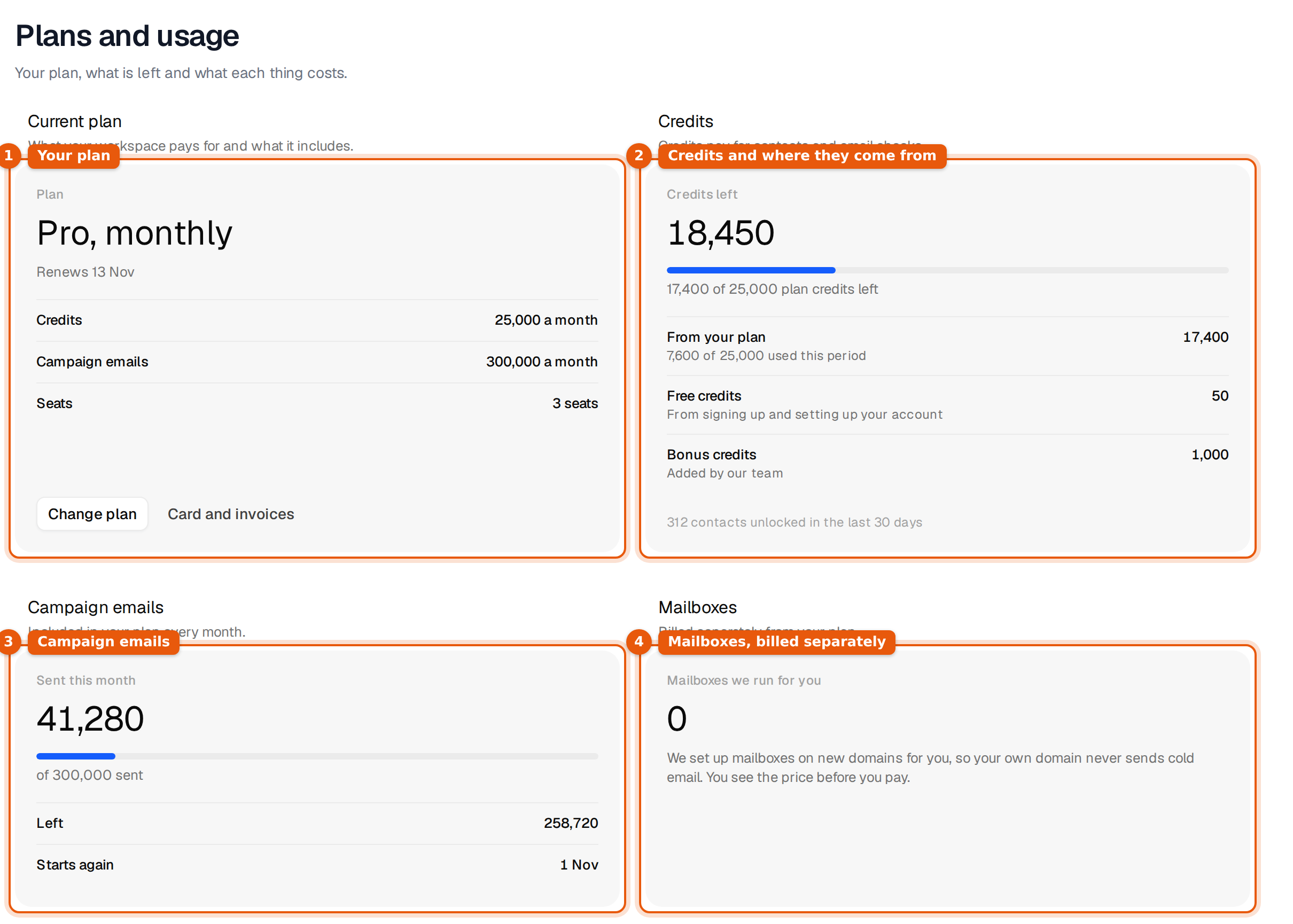
The four cards at the top
| Card | What it shows |
|---|---|
| Current plan | The plan name and billing period (for example Pro, monthly) and the renewal date. Below that the price, the credits and campaign emails it includes each month, and the seats. During the free trial it shows the campaign emails of the trial, how many mailboxes are connected and how many leads are in campaigns. |
| Credits | Credits left in total, a bar for how much of this month's plan credits you used, and where the rest comes from: From your plan, Bought in packs, Free credits and Bonus credits. Rows only show when they hold something. |
| Campaign emails | How many campaign emails went out this month, out of how many, how many are Left, and when the count Starts again. |
| Mailboxes | Mailboxes we run for you on new domains. They are billed separately from your plan, each order with its next charge. With no orders yet you see Order mailboxes. |
The two buttons on the plan card do what they say. Change plan scrolls down to the plan cards. Card and invoices opens Settings, then Billing, where your card and every receipt live. Without a plan the first button reads Choose a plan.
Where your credits come from
| Row | Where it comes from | How long it lasts |
|---|---|---|
| From your plan | Your monthly plan credits | Until the month ends. The plan's credits start again every month. |
| Bought in packs | Pay as you go packs you bought | 365 days from the purchase |
| Free credits | Signing up and setting up your account | During the free trial they end with the trial, on the date shown |
| Bonus credits | Added by our team | Shown as long as they are there |
The line at the bottom of the card counts the contacts you unlocked in the last 30 days.
Activity in the last 30 days
Below the cards is a bar per day for the last 30 days. Today's bar is the dark one. Next to it is a short breakdown: Searches, Previews, Unlock requests, Export requests, Email finder lookups and Email check requests. These are actions, not credits. A search is free, so a busy day of searching can show many actions and cost nothing.
What costs credits
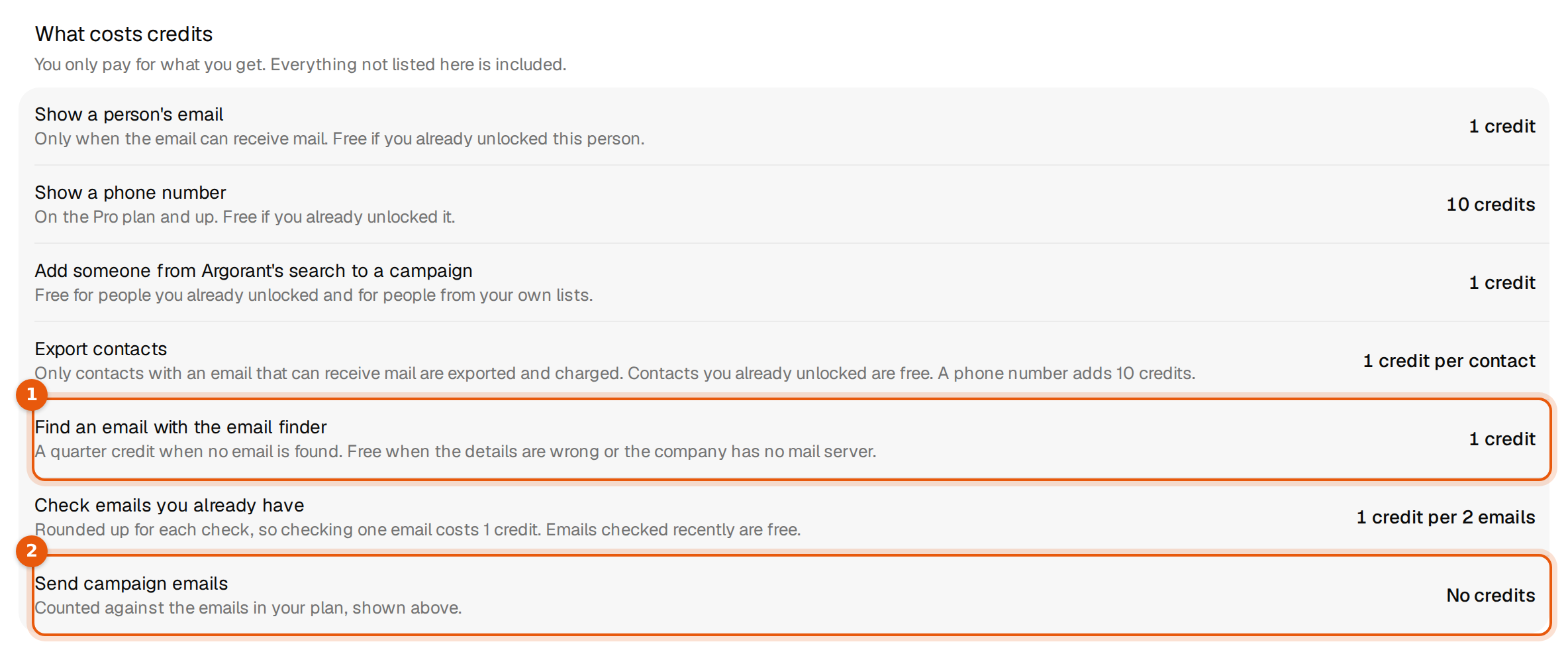
The page lists every action that spends credits, with the price the app charges today. Anything not on this list is included in your plan.
| Action | Cost | Good to know |
|---|---|---|
| Show a person's email | 1 credit | Only when the email can receive mail. Free if you already unlocked this person. |
| Show a phone number | 10 credits | On the Pro plan and up. Free if you already unlocked it. |
| Add someone from Argorant's search to a campaign | 1 credit | Free for people you already unlocked and for people from your own lists. |
| Export contacts | 1 credit per contact | Only contacts with an email that can receive mail are exported and charged. Contacts you already unlocked are free. A phone number adds 10 credits. |
| Find an email with the email finder | 1 credit | A quarter credit when no email is found. Free when the details are wrong or the company has no mail server. |
| Check emails you already have | 1 credit per 2 emails | Rounded up for each check, so checking one email costs 1 credit. Emails checked recently are free. |
| Send campaign emails | No credits | They count against the campaign emails in your plan. |
Change plan or buy credits
The last section holds the four plans and the four credit packs. Pick Monthly or Yearly, save 20% at the top. Your current plan is marked Current.
| Plan | Per month | Credits a month | Campaign emails a month | Seats |
|---|---|---|---|---|
| Starter | $99 | 5,000 | 100,000 | 1 |
| Pro | $249 | 25,000 | 300,000 | 3 |
| Scale | $449 | 100,000 | 600,000 | 10 |
| Hyperscale | $649 | 200,000 | 1,000,000 | 20 |
Yearly billing costs about 20% less. Under Pay as you go you buy credits once, with no subscription: 500 credits for $17.50, 5,000 for $69, 25,000 for $199 or 100,000 for $499. Pack credits stay valid for 365 days. Campaigns need a plan, packs alone do not include campaign emails.
What happens when you click
- A bigger plan starts today. You are charged now, less the unused part of your current plan, and the new credits and campaign emails apply at once.
- A smaller plan starts when your current period ends. Nothing is charged today, and the card shows the date it moves.
- On a yearly plan you can change to another tier at any time. Moving from yearly to monthly happens at renewal, so the monthly cards show On annual plan.
- A pack opens a secure checkout. The credits show under Bought in packs once the payment goes through.
Every charge appears under Invoices in Settings, then Billing. We do not email receipts, so that page is the record.
Common questions and mistakes
- A teammate cannot change the plan. Only the workspace owner can change the plan or buy credits. Teammates see the same numbers and a note naming who to ask.
- The plan card shows Payment failed. The last charge did not go through. Update the card under Card and invoices. When a plan ends, campaigns stop sending until you pick a plan again.
- Credits went down but you did not export. Check the activity breakdown. Unlocks, email finder lookups and email checks spend credits too. Searches and previews never do.
- The campaign email count looks wrong. It counts the whole workspace, all campaigns together, and starts again on the first day of each month. See Campaign emails: your monthly allowance.