
Some replies are noise: automatic ticket confirmations from a support desk, newsletters someone signed you up for, or job board alerts. Hidden words keep those conversations out of the Unibox and out of its folder counts, for everyone in your workspace. Nothing is deleted, and you can bring them back at any time.
Hide a word or phrase
- In the Unibox, click the crossed-out eye at the top right. The Hidden words window opens.
- Type a word or phrase in the field, for example ticket number or unsubscribe from this newsletter.
- Click Hide.
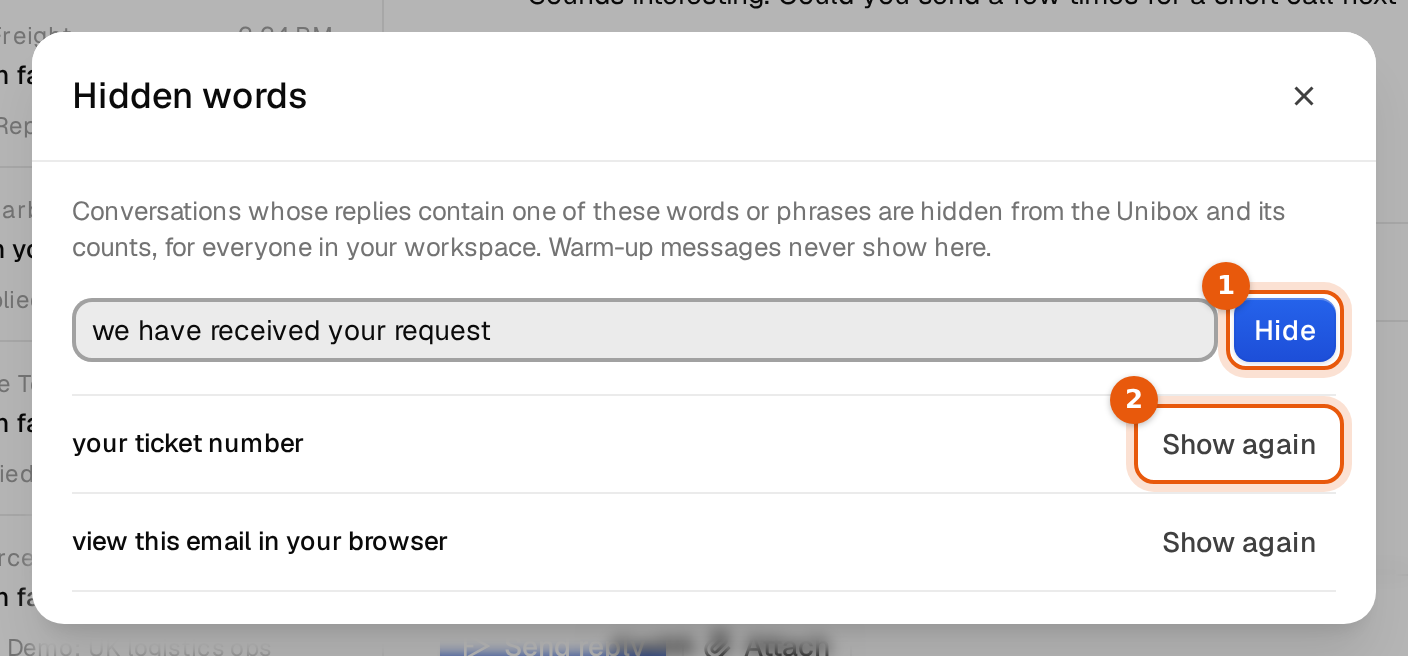
The phrase appears in the list below the field, and the Unibox reloads without the matching conversations. The counts next to the folders go down to match.
How matching works
- Argorant looks for the phrase in the replies people sent you: the subject, the text and the sender's address. Your own campaign emails are not searched, so a word from your template never hides a whole campaign.
- Capital letters do not matter. Ticket also hides TICKET and ticket.
- The phrase matches anywhere, also inside longer words. auto also hides replies with automatic or autumn. Use a longer phrase when a short word hides too much.
- A whole conversation is hidden as soon as one of the person's replies contains the phrase.
Bring conversations back
Open Hidden words again and click Show again next to the phrase. The conversations return to the Unibox and its counts at once, with their labels as before.
Good phrases to hide
| Noise | Phrase that works |
|---|---|
| Support desk confirmations | your ticket number, we have received your request |
| Newsletters | view this email in your browser |
| Replies from a system address | the address itself, for example noreply@helpdesk.example |
Limits
- A phrase needs at least 2 characters and can have up to 120.
- A workspace can hide up to 200 words or phrases.
- Hidden words apply to the whole workspace. Everyone on your team sees the same Unibox.
Things to watch
- Do not hide words a real answer could contain, such as price, meeting or thanks. You would miss leads.
- Hidden is not blocked. The person can still be in your campaigns. To stop contacting someone, use the block list.
- Out of office replies do not need hiding. They get their own label, and you can filter them out with the label filter.
- Warm-up emails never show in the Unibox, so you do not need to hide them.