
A webhook is a message Argorant sends to an address on your own server when something happens in your account. Instead of asking the API again and again whether an export is done or a reply came in, your server is told. Use it to update your CRM, post to a team chat or start an automation in n8n, Zapier or Make. Webhooks come with the Pro plan and up.
Add a webhook
- Open Settings, then API keys and scroll to Webhooks.
- Under New webhook, enter your address in the URL field. It must start with
https://and be reachable from the internet. - Click the events you want. A picked event shows a tick. You need at least one.
- Click Add webhook.
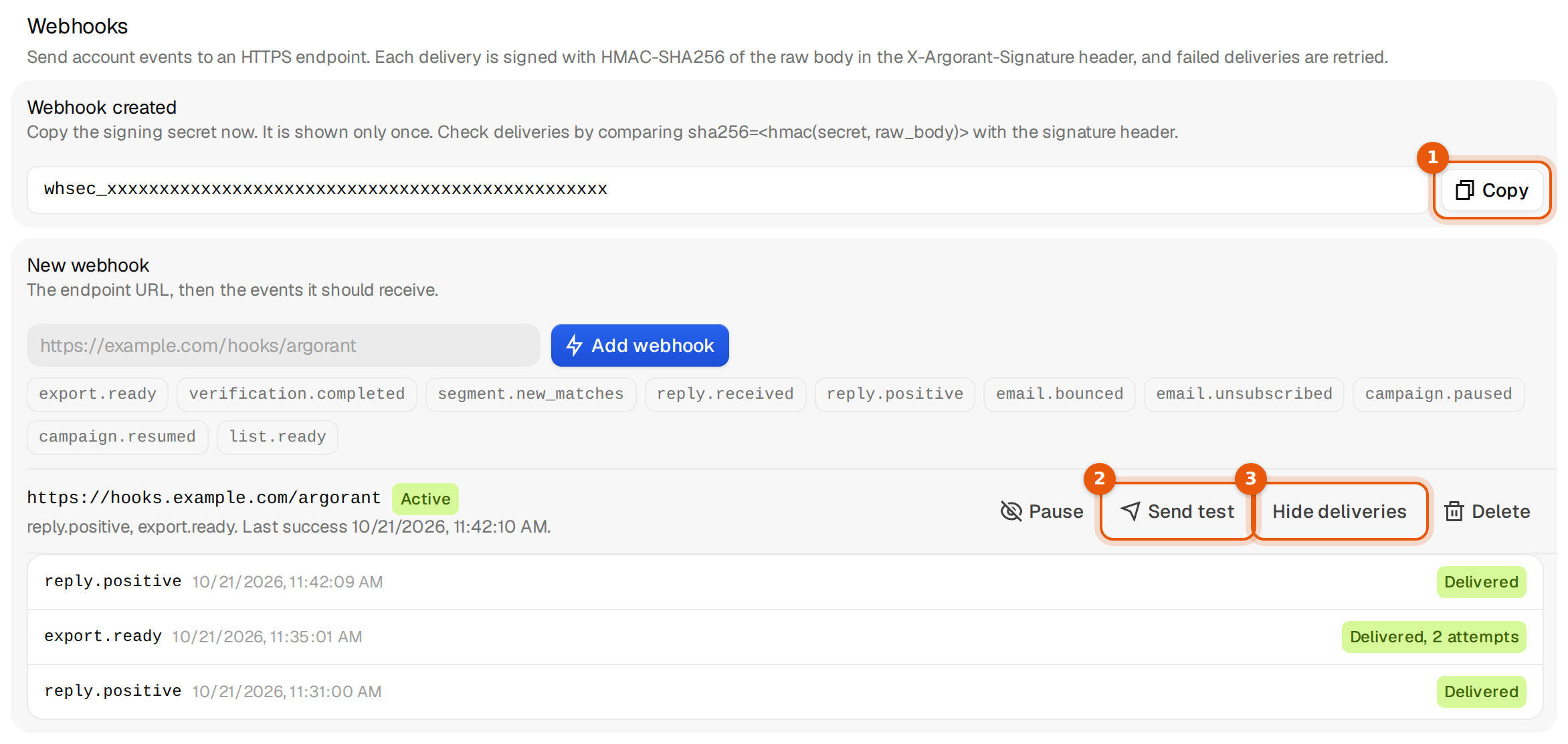
- A box Webhook created shows the signing secret, which starts with
whsec_. Click Copy and store it with your server's other secrets. It is shown only once. - Click Send test on the new row, then Deliveries to see whether it arrived.
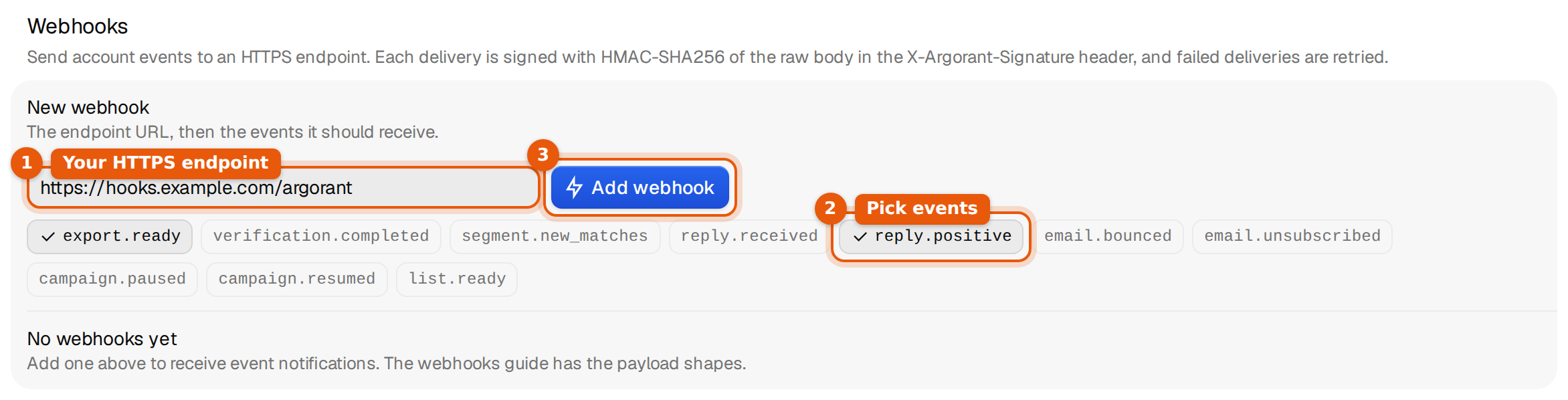
If your plan does not include webhooks, clicking Add webhook opens the upgrade screen instead.
Events
| Event | When it is sent | Main fields in data |
|---|---|---|
reply.received | A person replied to one of your campaigns. Out-of-office and other automatic replies are left out. | classification, lead_email, campaign_id, subject, snippet |
reply.positive | A reply was labelled interested, positive or as a meeting request. | Same as reply.received |
email.bounced | A campaign email bounced. | lead_email, campaign_id, subject |
email.unsubscribed | Someone asked not to be emailed, by reply or with the opt-out link. | classification, lead_email, campaign_id |
campaign.paused | A campaign stopped sending on its own, for example because the month's campaign emails are used up. | campaign_id, campaign_name, reason |
campaign.resumed | Sending started again, for example when the month resets or the plan grows. | campaign_id, campaign_name, reason |
export.ready | An export file is ready to download. | job_id, total_rows, verified_rows, download_api_path |
list.ready | A saved list finished filling. | list_id, list_name, total_items |
verification.completed | A check of one of your own addresses finished. | email, status, deliverable |
segment.new_matches | A saved filtered list has more matching people than when it was last counted. It is checked about every 30 minutes. | list_id, previous_total, current_total, new_matches |
Campaign events go to the webhooks of everyone in the workspace that owns the campaign.
What a delivery looks like
Each delivery is a POST with a JSON body and these headers:
Content-Type: application/json
User-Agent: Argorant-Webhooks/1.0
X-Argorant-Event: reply.positive
X-Argorant-Delivery: 903
X-Argorant-Signature: sha256=5d1c0e…
The body always has the same four fields. data changes with the event:
{
  "event": "reply.positive",
  "delivery_id": "903",
  "created_at": "2026-10-21T09:42:09.512340+00:00",
  "data": {
    "classification": "interested",
    "lead_email": "anna@northwind-supply.example",
    "campaign_id": "3f6c1a2e-8b1d-4c55-9a0e-2d7f4b1c9e10",
    "subject": "Re: Quick question, Anna",
    "snippet": "Sounds good. Can we talk on Thursday?"
  }
}
{
"event": "export.ready",
"delivery_id": "904",
"created_at": "2026-10-21T09:35:01.104220+00:00",
"data": {
"job_id": 84213,
"status": "done",
"total_rows": 500,
"verified_rows": 482,
"status_api_path": "/api/mcp/exports/84213",
"download_api_path": "/api/mcp/exports/84213/download"
}
}A Send test delivery uses the first event of the webhook and carries {"test": true, "event": "…", "message": "Argorant webhook test delivery"} as data, so your code can tell it apart from a real one.
Check that a delivery came from Argorant
X-Argorant-Signature is sha256= followed by the hex HMAC-SHA256 of the raw request body, made with your signing secret. Compute the same on your side and compare. Use the body exactly as it arrived, before any JSON parsing, or the signature will not match.
// Node.js (Express)
const crypto = require("crypto");
app.post("/argorant", express.raw({ type: "application/json" }), (req, res) => {
  const expected = "sha256=" + crypto.createHmac("sha256", process.env.ARGORANT_WEBHOOK_SECRET)
    .update(req.body).digest("hex");
  const got = req.get("X-Argorant-Signature") || "";
  if (got.length !== expected.length ||
      !crypto.timingSafeEqual(Buffer.from(got), Buffer.from(expected))) return res.sendStatus(401);
  const event = JSON.parse(req.body);
  res.sendStatus(200);          // answer fast, do the work afterwards
});
# Python (Flask)
import hmac, hashlib, os
@app.post("/argorant")
def argorant():
raw = request.get_data()
expected = "sha256=" + hmac.new(os.environ["ARGORANT_WEBHOOK_SECRET"].encode(), raw, hashlib.sha256).hexdigest()
if not hmac.compare_digest(expected, request.headers.get("X-Argorant-Signature", "")):
return "", 401
return "", 200Answers, retries and switching off
- Any
2xxanswer counts as delivered. Answer within 10 seconds and do slow work after you answered. - Anything else, a timeout, or a redirect counts as failed. Redirects are never followed, so use the final address.
- A failed delivery is tried again after 1 minute, 5 minutes, 30 minutes, 2 hours and 6 hours. After 6 tries it stays failed.
- After 50 failures in a row the webhook is switched off and shows as Paused. Fix your server, then click Resume; that also resets the failure count.
- The same event can reach you twice, for example after a retry. Use
delivery_id(also inX-Argorant-Delivery) to skip ones you already handled.
The row of each webhook shows its events, the time of the Last success and recent failures with the last error. Deliveries lists the latest 25 deliveries with their event, time and result, such as Delivered, Delivered, 2 attempts, pending or failed.
Manage a webhook
- Pause stops deliveries without deleting anything. Resume starts them again. Send test only works while the webhook is active.
- Delete removes the webhook and its delivery history after one confirmation.
- Under Settings, then Workspace, the danger zone has Delete all webhooks.
From the API and the CLI
The same webhooks can be managed with an API key. Through the API the key needs permission to manage lists, which keys from Settings have.
curl -s https://app.argorant.com/api/v1/webhooks \
  -H "Authorization: Bearer $ARGORANT_API_KEY" \
  -H "Content-Type: application/json" \
  -d '{"url": "https://hooks.example.com/argorant", "events": ["reply.positive", "export.ready"]}'

npx argorant webhooks add https://hooks.example.com/argorant --events reply.positive,export.ready
npx argorant webhooks                 # your webhooks and every event you can pick
npx argorant webhooks test 41
npx argorant webhooks deliveries 41
npx argorant webhooks set 41 --inactive
npx argorant webhooks rm 41 --yes
The create call answers with the secret once, exactly like the Settings page.
Limits
- Up to 10 webhooks per account, paused ones included.
- The address must start with
https://, be at most 2,048 characters, and point to a public internet address. Private networks, local addresses and Argorant's own services are refused. - Webhooks are included from the Pro plan.
Common mistakes
- The address is refused when you add it. You will see one of these messages.
The webhook address must be a public internet address on your own server. Private networks, local addresses and our own services can't receive webhooks.
Use a public HTTPS address. For testing on your laptop, use a tunnel service that gives you a public HTTPS address.We could not find a public internet address for this webhook. Check the address and try again.
- The signature never matches. Your framework parsed the JSON before you computed the HMAC. Hash the raw bytes.
- Deliveries fail with a redirect. The address answers with 301 or 302, for example from http to https or with a missing slash. Enter the final address.
- The secret is lost. It cannot be shown again. Delete the webhook and add it again to get a new secret.
- No events arrive. Check that the webhook is Active, that you picked the right events, and that something actually happened. Send test shows whether the path to your server works.
What happens next
Once deliveries show as Delivered, connect the events to your workflow. A common pattern is export.ready starting a download and an import into your CRM. Related reads are API keys and the REST API and n8n.