
An API key lets your own code, scripts and tools use your Argorant account without a browser. The REST API, the command line tool, Postman, the automation platforms (n8n, Zapier, Make, Albato, Clay) and the browser extension all use the same key. Which key goes where lists them all. Everything you do with it lands in the same account as the app: the same credits, lists, exports and campaigns.
If you use Claude, ChatGPT, Cursor or another AI app that can add a connector, you do not need a key at all. The connector signs in on Argorant's own screen. Keys are for code you run yourself.
Create a key
- Open Settings, then API keys.
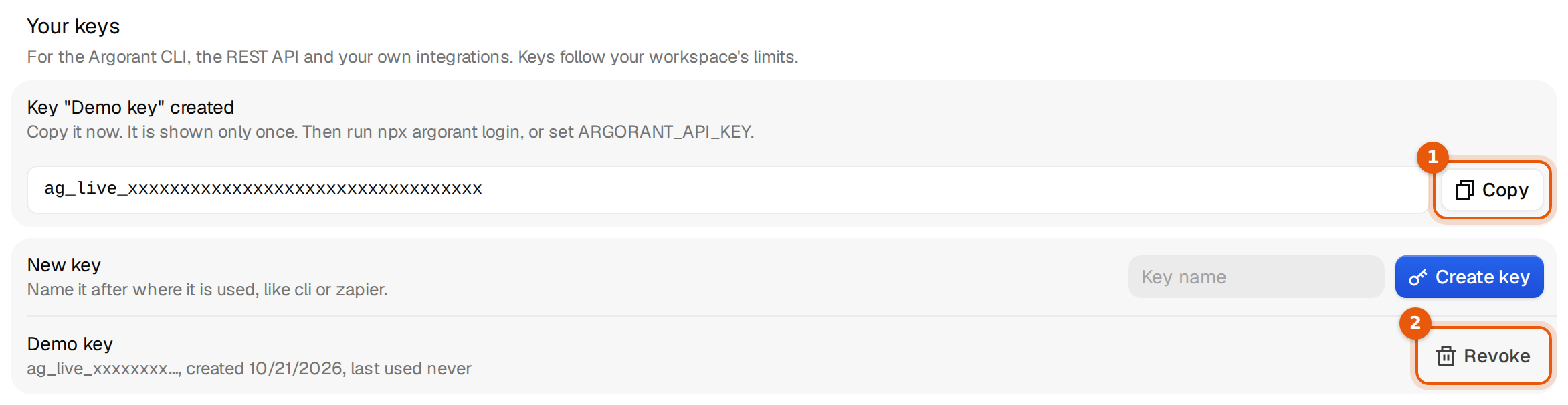
- Under Your keys, type a name in the Key name field. Name it after where it will be used, like
cli,zapierorcrm-sync. - Click Create key.
- A box appears with the text Key "…" created and the full key. Click Copy and store it in your password manager or your secret store right away.

Copy it now. It is shown only once. Then run npx argorant login, or set ARGORANT_API_KEY.
Argorant stores only a fingerprint of the key, so nobody can show it to you again. After you leave the page, the list shows the name, the first characters of the key, when it was created and when it was last used.
Send the key with every request
Every request carries one header. The base address is https://app.argorant.com.
Authorization: Bearer ag_live_xxxxxxxxxxxxxxxxxxxxxxxxKeep the key in an environment variable instead of typing it into commands, so it does not end up in your shell history:
export ARGORANT_API_KEY=ag_live_xxxxxxxxxxxxxxxxxxxxxxxx

curl -s https://app.argorant.com/api/v1/account \
  -H "Authorization: Bearer $ARGORANT_API_KEY"
The account call is free. It answers with your plan, your credits and the limits that apply to this key, so it is the right first call for any script.
The most used calls
The current API lives under /api/v1. GET https://app.argorant.com/api/v1 lists every operation, and the full reference with every field is at docs.argorant.com.
| Call | What it does | Cost |
|---|---|---|
GET /api/v1/account | Plan, credits, limits and the key's permissions | Free |
GET /api/v1/people/count | How many people match your filters | Free |
GET /api/v1/people/search | Matching people with contact details hidden, up to 100 per page | Free |
POST /api/v1/people/reveal | Full contact details for up to 25 people | Credits |
POST /api/v1/exports | A checked CSV file, built in the background | Credits |
GET /api/v1/exports/{job_id} | Progress and result of an export | Free |
GET /api/v1/exports/{job_id}/download | The finished file, as often as you like | Free |
GET /api/v1/lists, POST /api/v1/lists | Your saved lists | Free |
GET /api/v1/companies/search | Companies that match your filters | Free |
POST /api/v1/webhooks | Events sent to your own server (Pro plan and up) | Free |
The older /api/mcp/... addresses (for example /api/mcp/people/count and /api/mcp/exports/create) still work, so existing scripts do not break. Use /api/v1 for anything new.
Example: count, then export
Counting is free, so size the audience first:
curl -s -G https://app.argorant.com/api/v1/people/count \
  -H "Authorization: Bearer $ARGORANT_API_KEY" \
  --data-urlencode "title=CFO" \
  --data-urlencode "country=Germany"

{"count": 18432}
Then create the export. The limit is the most rows you want (1,000 if you leave it out):
curl -s https://app.argorant.com/api/v1/exports \
  -H "Authorization: Bearer $ARGORANT_API_KEY" \
  -H "Content-Type: application/json" \
  -H "Idempotency-Key: cfo-de-2026-10" \
  -d '{"filters": {"title": "CFO", "country": "Germany"}, "limit": 500}'

{"type": "job", "job_id": 84213, "status": "queued",
 "status_url": "/api/v1/exports/84213",
 "download_url": "/api/v1/exports/84213/download"}
Poll the status address every few seconds until downloadable is true, then fetch the file:
curl -s https://app.argorant.com/api/v1/exports/84213/download \
  -H "Authorization: Bearer $ARGORANT_API_KEY" -o cfos.csv
You pay only for contacts with a working email. The status answer says how many were charged in credits_charged and explains it in billing_note. If you would rather be told than poll, subscribe a webhook to export.ready.
Retries without double work
Every write under /api/v1 accepts an Idempotency-Key header. Send the same key with the same body again within 24 hours and you get the first answer back instead of a second export or a second purchase. The same key with a different body answers 409 with idempotency_conflict. Use one key per real action, for example the date plus what the job does.
Errors
Every error has the same shape: a stable code, one plain sentence in message, and a request_id. Quote the request id if you write to support.
{"error": {"code": "insufficient_credits",
           "message": "The balance does not cover the file.",
           "details": {}},
"request_id": "req_8f2c1d9e0b7a4c3e9f1a2b3c4d5e6f70"}| Status | Typical code | What to do |
|---|---|---|
| 401 | unauthorized | The key is missing, mistyped or revoked. Check the header and create a new key if needed. |
| 402 | insufficient_credits, plan_required | Add credits or change plan. Nothing was charged. |
| 403 | scope_missing, permission_missing | The key or your workspace role may not do this action. |
| 404 | not_found | The id does not exist in your workspace. |
| 409 | idempotency_conflict | You reused an Idempotency-Key with a different body. |
| 422 | validation_error | A field is missing or has the wrong type. details names it. |
| 429 | rate_limited, daily_limit_reached | Slow down, or wait for the daily reset at midnight UTC. |
Limits
Each API key may send 30 requests a minute during the trial and without a plan (60 through an AI assistant), 60 on Starter, 240 on Pro, 600 on Scale and 1,200 on Hyperscale, and up to a quarter of that, at least 15, in any 10 seconds. Searches and counts are free. On a plan they have no daily limit, only a speed limit per account: 30 a minute on Starter, 60 on Pro, 90 on Scale, 120 on Hyperscale. During the trial and without a plan they are limited per account, across all its keys and the connector: through an AI assistant 20 a minute, 1,000 counts and 1,000 search rows a day; through an API key or the command line 10 a minute, 500 counts and 500 search rows a day. During the trial and without a plan, each key also has daily limits of 100 revealed people and 50,000 export rows; on a plan, credits bound reveals and exports. Daily limits reset at midnight UTC; saved lists, exports and campaigns handle bigger numbers. Account entitlement, scopes and the action's credit budget remain authoritative.
Every response carries X-Request-Id, and every response to a key carries X-RateLimit-Limit, X-RateLimit-Remaining and X-RateLimit-Reset, so your code can slow down before it hits a 429. One export can hold up to 500,000 rows; above 50,000 it is split into several files.
Common mistakes
- The word Bearer is missing. The header is
Authorization: Bearer ag_live_…, with one space after Bearer. - Part of the key is missing. Copy it with the Copy button, not by selecting the text. The list only shows the first characters, which do not work on their own.
- A key in a browser page or a public repository. Anyone who sees it can spend your credits. Keep keys on servers and in secret stores, and revoke a key that leaked.
- One key everywhere. Create one key per tool. Then you can revoke one without breaking the others, and the last used date tells you which tool is still active.
- Polling an export in a tight loop. It counts against your requests per minute. Wait a few seconds between checks, or use the
export.readywebhook.
What happens next
Lists and exports you create through the API show up in the app under Lists and Exports, and spent credits show in your balance. For the terminal, read the Argorant CLI. To get told when something finishes, read Webhooks. To rotate or revoke keys, read Managing and revoking API keys.