
A subsequence is a short set of emails for people who replied in a certain way. When a reply contains one of its keywords, that person leaves the main sequence and gets the subsequence instead, in the same thread. For example, a reply with interested or send more info can get a short email with two times to talk, and a reply with next quarter can get a gentle check-in a week later.
Set one up
- Open the campaign and click the Subsequences tab.
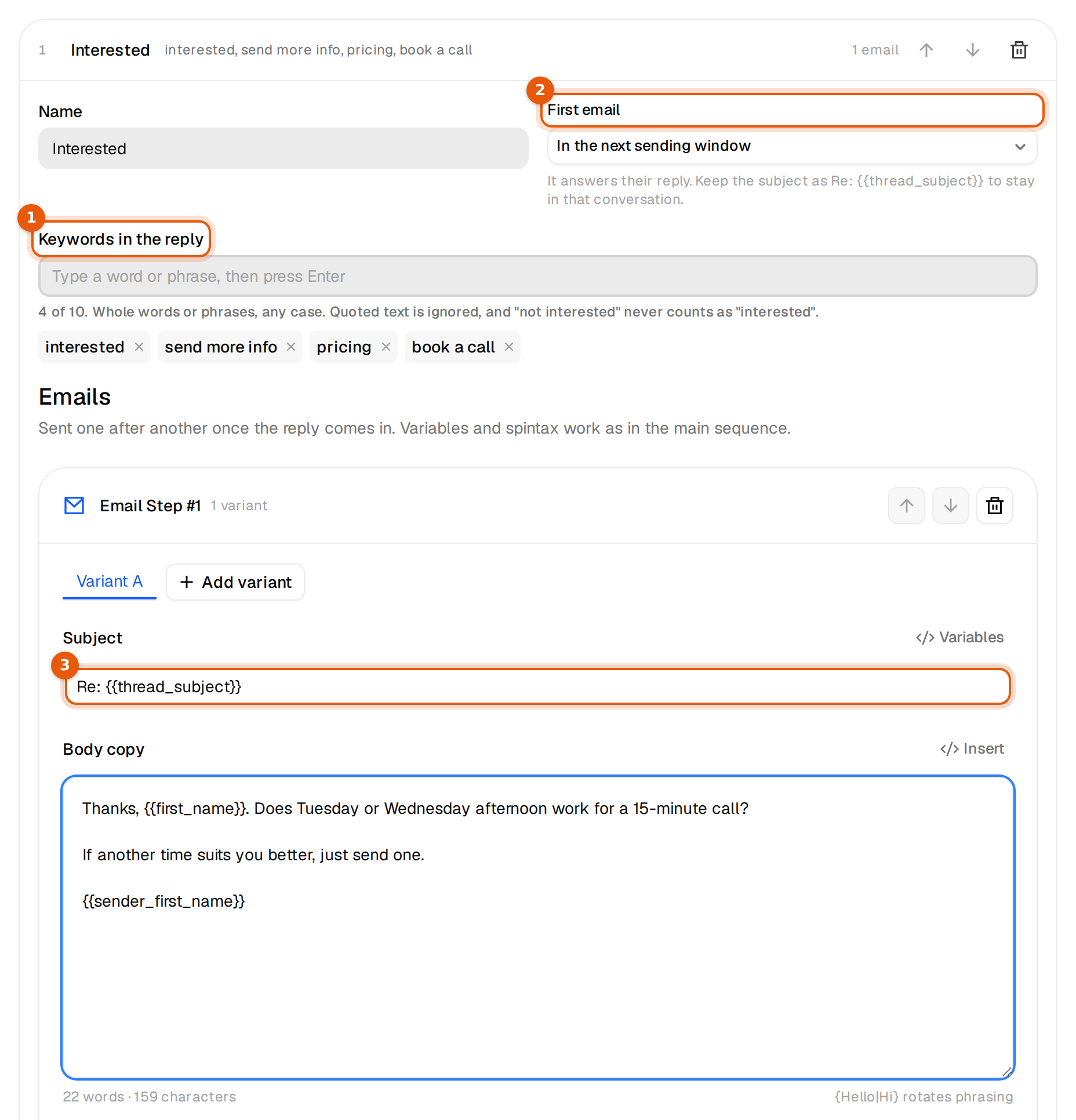
- Click Add subsequence. The first one is called Interested. Change the Name if you like. Only you see it.
- Under Keywords in the reply, type a word or phrase and press Enter. Add up to 10, each up to 60 characters. A comma also adds the keyword.
- Under First email, choose when it goes out: In the next sending window, or 1, 2, 3, 5 or 7 days after the reply.
- Write the first email. Its subject starts as
Re: {{thread_subject}}, which continues the subject of the contact's reply. Keep it that way to stay in the conversation. - Add more emails with Add follow-up if you need them, up to 8 per subsequence. Variables, spintax and variants work as in the main sequence.
- Click Save subsequences. The button stays grey and shows the first problem until every subsequence has a name, at least one keyword and complete emails.

You can have up to 5 subsequences per campaign. Each folded line shows its keywords and, once people are in it, how many are in progress, how many emails went out and how many replied. The arrows change the order. The bin deletes a subsequence. If people are still in it, you are asked first, and they get none of its remaining emails once you save.
Turn one off
The switch on a subsequence's line turns it off or back on, without deleting it. Off means no new reply starts it. Its keywords and emails stay saved. When you turn it off, you choose what happens to the people already in it. Let leads already in the subsequence finish keeps their remaining emails. Stop them now ends them at once. Turn it on again, and replies with its keywords start it again.
Duplicate campaign copies a campaign as a new draft named with (copy) at the end, with its settings and emails. Tick Include subsequences to copy them too, switched off. People, senders and results are never copied.
How replies are matched
- Subsequences are checked from top to bottom. The first match wins, so put the most specific one on top.
- Keywords match in any case and inside a short sentence. yes matches Yes! but not yesterday.
- Close variants count too, such as a plural or a small typo in longer words. Words of 1 to 4 letters, such as yes, call or demo, only match exactly or as a plural.
- Only the new reply counts. Quoted earlier emails, signatures and the subject are ignored.
- A keyword that is negated does not count. Not interested never counts as interested.
- Replies that ask to stop, such as unsubscribe, remove me, no thanks or just stop, never start a subsequence, whatever else they say. This also works in German, French, Spanish and Dutch.
What happens on a match
- The person leaves the main sequence. Their status becomes Replied.
- Other campaigns stop cold emails to them.
- The subsequence sends from the same mailbox, in the same thread, inside the campaign's sending hours.
- If they reply to a subsequence email, that reply is checked again the same way. It can start the same or another subsequence, or end their emails.
- When they finish the subsequence, they are not emailed again by your campaigns.
Replies without a keyword
They follow Stop on reply on the Settings tab. The Subsequences tab tells you which rule is active.
| Stop on reply | A reply without a keyword |
|---|---|
| On (default) | Ends that person's emails in this campaign. The reply waits for you in the Unibox. |
| Off | Is recorded and shown in the Unibox, and the main sequence keeps going. |
See What happens when someone replies.
Good keyword sets
| Subsequence | Keywords | First email |
|---|---|---|
| Interested | interested, send more info, pricing, book a call | In the next sending window |
| Later | next quarter, next year, check back later | 7 days after the reply |
| Wrong person | wrong person, other department, colleague | In the next sending window |
Common mistakes
- Keywords that are too short or too broad. A word like yes turns up in many replies you did not mean. Prefer phrases.
- A general subsequence above a specific one. The first match wins. Move the specific one up.
- A new subject on the first email. It then starts a new thread instead of answering. Keep
Re: {{thread_subject}}.
Changes to a running campaign apply to subsequence emails not sent yet.