
Every mailbox in Inboxes tells you whether it can send right now, and if not, why. This article walks through the numbers at the top, the Status column, the filters, and the fix for each problem.
The three numbers at the top
| Number | What it counts |
|---|---|
| Connected | Mailboxes signed in and working, out of all your mailboxes. Bought mailboxes still in their 24 hours of setup show as N aging next to it. |
| Ready to send | Connected, healthy and active mailboxes, with the cold emails they can still send today. |
| Needs attention | Mailboxes that need something from you or from us. Click it to see only those. |
When mailboxes need attention, a notice above the table repeats it in one sentence and offers Show them.
2 mailboxes need attention, 1 of them a new sign-in.
What the Status column says
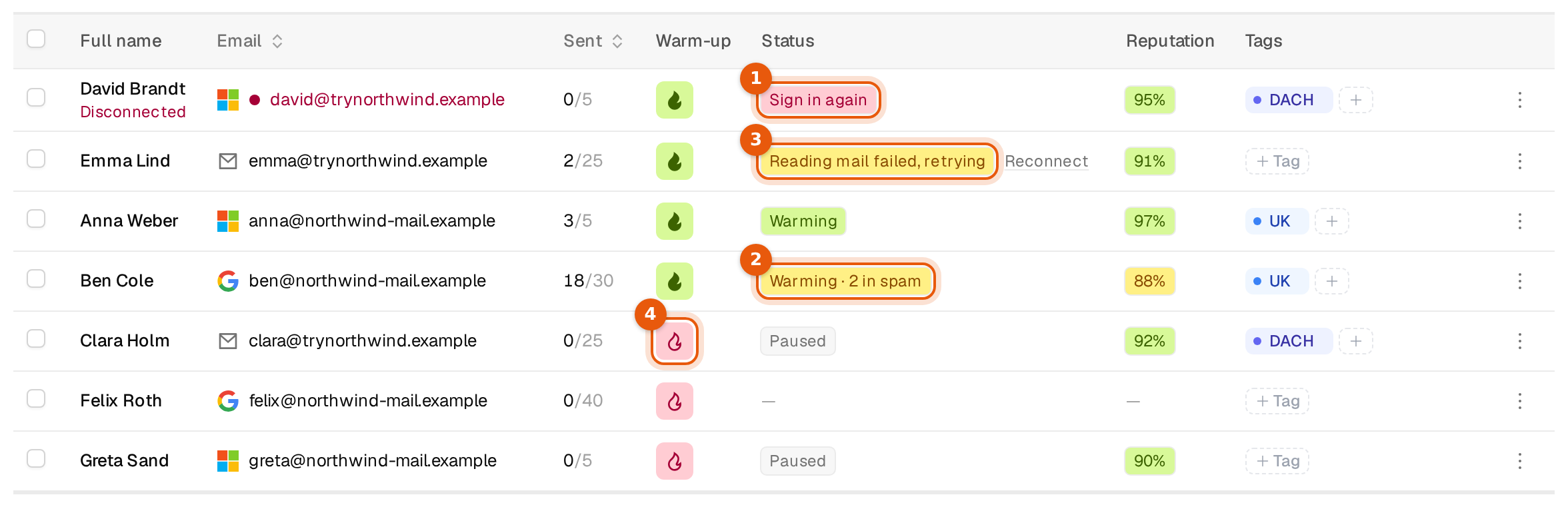
Hover a status to see a one-line explanation. Healthy mailboxes show their warm-up state. Mailboxes that need attention show the reason instead.
| Status | What it means | What to do |
|---|---|---|
| Warming | Connected, warm-up running. | Nothing. |
| Warming · N in spam | Connected, but some warm-up emails landed in spam. | Watch the reputation. If it keeps falling, lower Cold emails per day. |
| Paused | Connected, warm-up off. | Switch warm-up on with the flame or in Edit sender. |
| A dash | Connected, warm-up has never run. | Switch warm-up on. |
| Aging with hours left | A bought mailbox in its 24 hours of setup. | Wait. It switches itself on when aging ends. |
| Sign in again | The mailbox is signed out, for example after a password change. | Microsoft: Sign in or Reconnect all. SMTP: click Reconnect and type the password. |
| Not signed in yet | The mailbox was added but never finished its sign-in. | Finish the sign-in. |
| Microsoft refused access, Google refused access or The mail server refused access | The provider blocked the login. | Sign in again, or ask your admin to allow Argorant. |
| Missing permission | A permission was not granted during sign-in. | Sign in again and accept every permission. |
| Account is disabled | The account is switched off at your provider. | Turn it back on there, or delete the mailbox. |
| No mailbox on this account | The account has no mailbox behind it. | Delete it and connect the real sender. |
| Reading mail failed, retrying | Reading new mail failed for a moment. | Nothing. It clears after the next successful read. |
| Mailbox check failed or Checking the mailbox | Our check of the mailbox did not finish. | Wait. We retry on our own. |
| Still being set up | The mailbox is not finished yet. | Wait. |
A red address with Disconnected under the name also marks a mailbox that lost its connection. Its campaigns send from the other mailboxes until it is back.
Filter by status
The status filter above the table has these choices.
| Filter | Shows |
|---|---|
| All statuses | Every mailbox. |
| Ready to send | Mailboxes that can send now. |
| Connected | Every signed-in mailbox. |
| Aging | Bought mailboxes still in setup, the same as the N aging count. |
| Needs attention | The same mailboxes as the Needs attention number. |
| Needs sign-in | The part of those that need a new sign-in. |
| Disabled | Mailboxes you switched off. |
| Removable | Mailboxes that are not connected or have no mailbox behind them, the ones you can usually delete. |
Actions on one mailbox
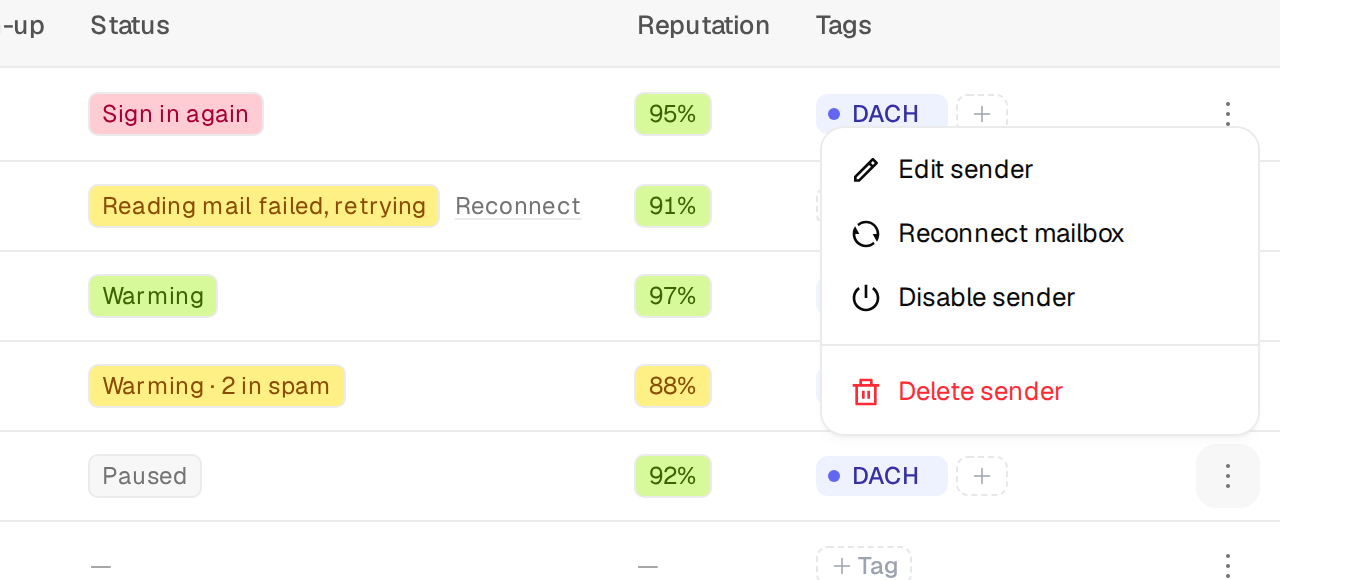
Click the three dots at the end of a row.
| Action | What happens |
|---|---|
| Edit sender | Display name, timezone, cold emails per day, warm-up, and the Active switch. |
| Reconnect mailbox | SMTP mailboxes only. Type the password again. |
| Disable sender or Activate sender | No new emails are scheduled from a disabled mailbox. Past sends and replies stay stored. |
| Delete sender | Removes the mailbox from Argorant after a confirmation. It is also taken off its campaigns. |
If deleting or disabling would leave a running campaign without any usable sender, Argorant stops you and says which campaign. Attach another mailbox or pause that campaign first. Contacts that had not been emailed yet wait for another available mailbox of the campaign.
Cannot delete this sender yet because Demo: UK freight managers would have no usable sender left. Attach a replacement sender or pause that campaign first.
Pause sending versus disable
Pause sending in the selection bar stops new campaign emails from the ticked mailboxes until you switch them back on. Warm-up keeps running, and analytics and replies are kept. Use it for a short break. Disable a mailbox when it should not be used at all for now.
Tags
Tags help you group mailboxes by client, domain or market. Click + Tag in a row, or add and remove tags for many mailboxes with Edit in the selection bar. The tag filter shows mailboxes that have every tag you pick. Manage the workspace's tags in Settings, then Workspace.