
Your signature appears where you write {{signature}}. When the email goes out, Argorant swaps it for the signature of the mailbox that sends it. If sends rotate across five mailboxes, each email carries the signature of its own mailbox. Nothing is added to any campaign on its own: an email without {{signature}} goes out exactly as you wrote it.
Put it in a campaign email
- Open the campaign and the Emails tab.
- Place the cursor where the signature should go, usually at the end of the body.
- Click Insert next to the body and choose signature under Sender. Or type
{{signature}}. - Click Save.
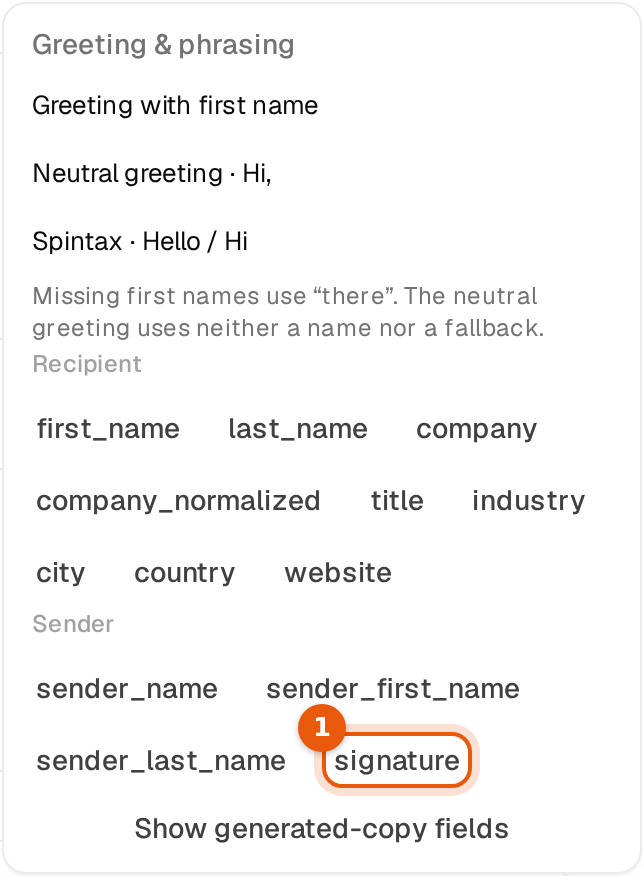
The signature only goes into the body. In a subject {{signature}} stays empty. It works in every step, follow-ups included.
The Use only in replies switch
Every signature has this switch, and it is on by default.
| Switch | Campaign emails with {{signature}} | Replies |
|---|---|---|
| On (default) | {{signature}} stays empty. The email goes out without a signature, and the empty spot leaves no gap. | Carry the signature. |
| Off | {{signature}} becomes the signature. | Carry the signature. |
That means you can put {{signature}} into your campaign now and decide later. While the switch is on, nothing changes for your recipients. You find the switch in Edit sender for one mailbox, in the selection bar window for many, and under Default signature in Settings.
Why first cold emails usually do better without a signature
A first cold email works best when it reads like a short note from one person to another. A full signature with a title, a company line and a website link makes it look like a sales email from a mailing list, and people skim it or ignore it. It also adds links, and a first email with links is more likely to land in spam or promotions. A plain first name at the end is enough.
Once someone answers, it is a conversation. Now your full name, role and company help them trust you and find you, so replies carry the signature. That is why the switch is on by default.
If you want a short sign-off in campaign emails, write {{sender_first_name}} at the end instead. If you do want the full signature in campaigns, turn the switch off for those mailboxes and test it against a version without.
In replies
- From the Unibox. Write
{{signature}}in your reply where it should go. It is replaced when you click send, with the signature of the mailbox that replies. The thread then shows the text that went out. - From an AI agent. Agent replies end with the mailbox signature on their own, see Default signature and agent signatures.
- Replies always carry the signature, whatever the switch says. Without any signature set,
{{signature}}is simply removed.
What happens with links
Campaign emails go out as plain text, like an email typed by hand. Replies can carry real links. So a link in your signature looks a little different in each.
| Where | Your signature line | What the recipient sees |
|---|---|---|
| Reply | [Book a call](https://meet.example.com/anna) | Book a call as a normal clickable link. |
| Campaign email | [Book a call](https://meet.example.com/anna) | Book a call (meet.example.com/anna), the label followed by the short address. |
| Campaign email | [northwind-mail.example](https://northwind-mail.example) | northwind-mail.example, once, because the label already is the address. |
| Campaign that sends no links | Any line with a link, a web address or an email address | That line is left out. The rest of the signature goes out. |
An HTML signature follows the same rules. Emails carry its text, its line breaks and its links: the label and address in campaign emails, real links in replies. Bold and italic do not carry over.
Check before you launch
- View preview in the email editor and test emails fill
{{signature}}the same way the real send does, with the sending mailbox's signature and its switch. With Use only in replies on, the preview shows no signature. That is correct. - To see the reply version, look at the Preview in the mailbox's Signature part. Replies show exactly that, with links you can click.
Common mistakes
- The signature is missing in campaign emails. Use only in replies is on. Turn it off for those mailboxes if you want it there.
- Two signatures in a reply. The reply already had a typed signature and also
{{signature}}. Keep one. - A long address in a campaign email. Give the link a short label, or link to a short address.
- A signature line vanished. It held a link or an address in a campaign that sends no links, or all its variables were empty for that mailbox.