
A bounce is an email that comes back because the address does not exist or the server refuses it. A few are normal. Many in a short time tell mail providers that you send to lists you never checked, and your mailboxes start landing in spam. Bounce protection pauses a campaign before a bad list does that damage.
Every new campaign has it switched on, with a limit of 10% after 100 people contacted. It can also pause the campaign when all of its mailboxes stop working.
Check or change it
- Open the campaign and click the Settings tab.
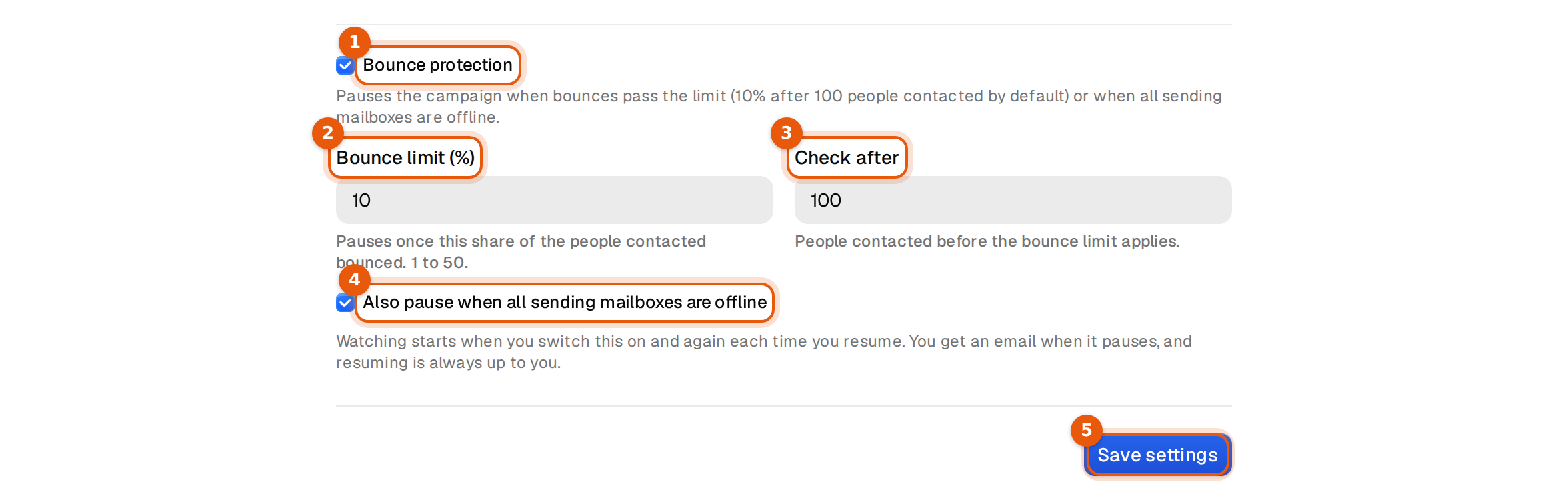
- Scroll to Bounce protection and make sure it is ticked. The fields below only show while it is on.
- Set the Bounce limit (%), from 1 to 50.
- Set Check after, the number of people contacted before the limit applies, from 20 up.
- Leave Also pause when all sending mailboxes are offline ticked, or untick it.
- Click Save settings.
The fields
| Field | What it means | Default |
|---|---|---|
| Bounce limit (%) | The share of people contacted who bounced. When the campaign reaches it, it pauses. Allowed from 1 to 50. | 10 |
| Check after | How many people must have been contacted before the limit counts. This stops two early bounces from pausing a fresh campaign. The lowest value is 20. | 100 |
| Also pause when all sending mailboxes are offline | Pauses when every mailbox of the campaign is switched off, disconnected or in an error state. | On |
How the bounce rate is counted
- It counts people, not emails. Someone who bounced twice counts once.
- Only people first contacted since the protection started watching count. Watching starts when you switch it on and again each time you resume.
- With the defaults, nothing happens until 100 people got their first email. If 10 of those 100 bounced, that is 10%, and the campaign pauses.
A mailbox that is still warming up or has reached its daily limit is not offline. Only one that cannot send at all counts. A campaign with no sending mailbox left also counts as offline.
What happens when it pauses
- The campaign status changes to Paused. No more emails go out. Everyone keeps their place in the sequence.
- You get an email that tells you which rule paused it.
- The campaign page shows the reason under the name.

The reasons read like this:
Auto-paused: 24 of the 231 people contacted bounced (10.4%), which reached your 10% limit. Check the list quality and your senders, then resume.
Auto-paused: all 6 sending mailboxes are offline or disconnected. Reconnect them in Senders, then resume.
Before you resume
Bounce protection only ever pauses. Resuming is always your decision. Fix the cause first, or the next batch bounces the same way.
| Reason | What to do |
|---|---|
| Too many bounces | Open the Leads tab and filter by Bounced. Look at where the list came from. If it holds Catch-all addresses or an old CSV, stop the campaign and start a new one with Valid addresses only. |
| Mailboxes offline | Open Inboxes, reconnect the mailboxes or replace them, then add working ones on the campaign's Senders tab. |
Then click Resume. Watching starts again from zero, so old bounces never pause the campaign a second time.
Common mistakes
- Turning it off to get past a pause. The campaign then sends whatever the bounce rate, and the mailboxes pay for it.
- A very high Check after on a small campaign. With 80 people and Check after at 100, the limit never applies.
- Resuming without changing anything. The same list keeps bouncing, and the campaign pauses again.
The best protection is a clean list. Keep Valid as the only grade when you add leads, and add Catch-all only on purpose. See Add leads to a campaign.