
A campaign sends a short series of plain emails to a group of people, from your own connected mailboxes, on a schedule you set. You set it up once. Argorant sends each email when it is due, stops for people who reply, and puts the replies in the Unibox. The numbers show up in Analytics and on the campaign itself.
The four parts of a campaign
Every campaign is built from the same four parts. The wizard asks for them in this order, and the campaign page keeps one tab for each.
| Part | What it is | Where you set it |
|---|---|---|
| Leads | The people it writes to: a saved list, a CSV of your own, people you add from Search, or rows sent over the API. | Wizard step 1, later the Leads tab |
| Emails | The first email and its follow-ups. Variables, spintax and variants make each one read like it was written for that person. | Wizard step 2, later the Emails tab |
| Senders | The connected Google Workspace or Microsoft 365 mailboxes it sends from. Sends rotate across them, and each mailbox keeps its own daily limit. | Wizard step 3, later the Senders tab |
| Schedule | When it starts, the timezone, sending hours, weekends, the daily limit and the gap between two sends from the same mailbox. | Wizard step 4, later the Settings tab |
The Campaigns page
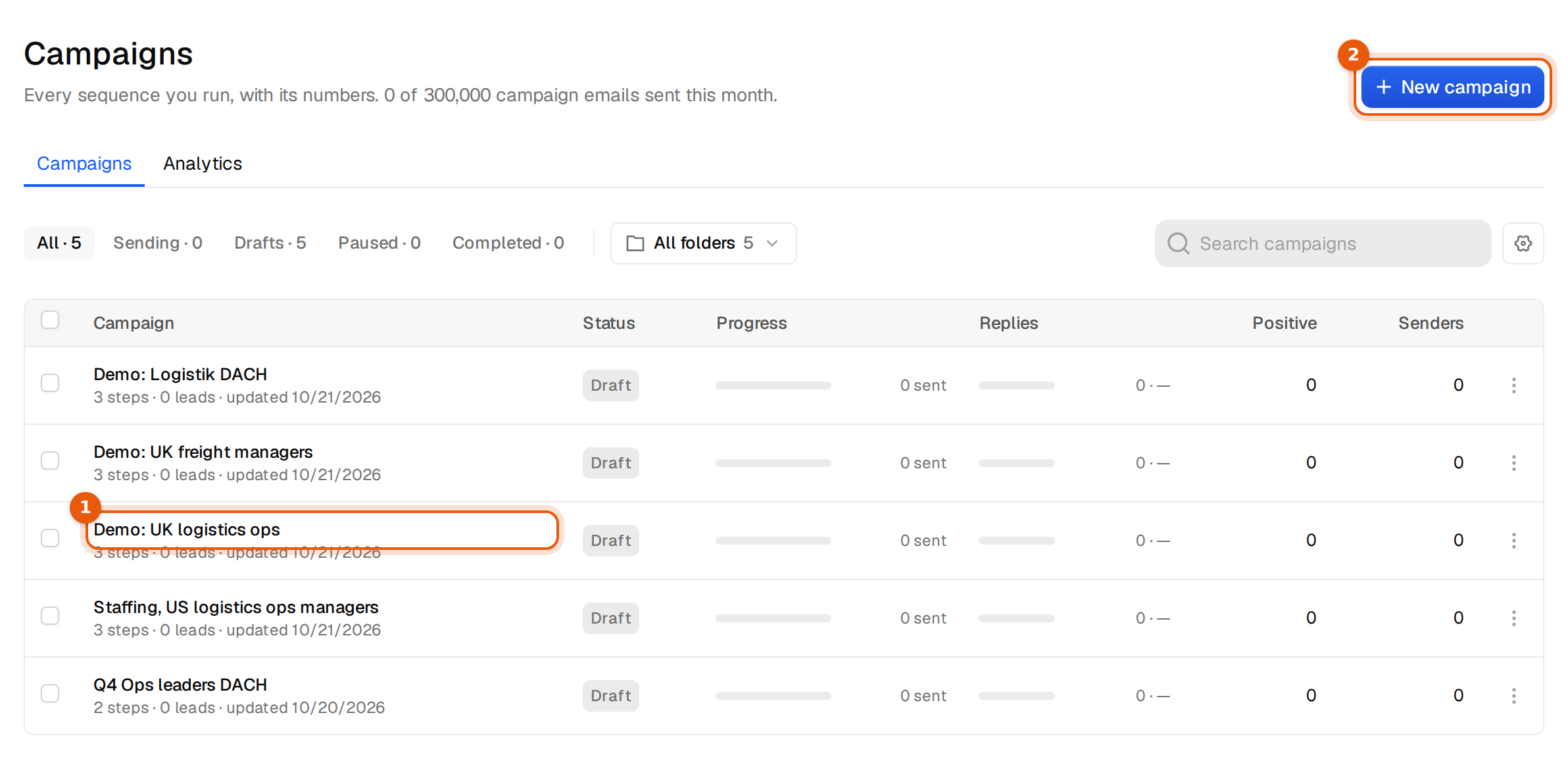
Open Campaigns under Outreach in the sidebar. The line under the title shows how many campaign emails you have sent this month, or how many of your trial you have used.
- The filters All, Sending, Drafts, Paused and Completed show how many campaigns are in each state.
- All folders narrows the table to one folder. Search campaigns finds a campaign by name.
- The gear button at the end of the row chooses which numbers the table shows.
- Tick one or more campaigns to Pause, Resume, Stop, Delete or Move to folder in one go.
- The menu at the end of each row has the same actions, plus Copy campaign ID and Copy API command.
A campaign that is sending cannot be deleted. Stop it first.
The campaign page
Click a campaign to open it. The line under the name shows leads, emails sent, replies, senders and, on a plan with a monthly allowance, how many campaign emails are left this month.

| Tab | What you do there |
|---|---|
| Overview | Sends, replies and outcomes of this campaign for the last 7, 30 or 60 days. |
| Leads | Everyone in the campaign, the status of each person and which email they are on. Add leads is here. |
| Emails | The sequence editor: the first email, follow-ups and variants. See Write the emails in your sequence. |
| Subsequences | Other emails for replies that contain words you choose. See Subsequences. |
| Senders | The mailboxes this campaign sends from. Add mailboxes or remove them. |
| Settings | Name, timezone, daily limit, sending hours, weekends, gap between sends, plain text, Stop on reply and Bounce protection. |
| API | The campaign ID and an example request for adding leads from your own tools. |
Campaign status
| Status | What it means |
|---|---|
| Draft | Saved, not sending. You can change everything. |
| Sending | Running. Emails go out inside the sending hours, within the daily limit. |
| Paused | Nothing goes out until you click Resume. People keep their place in the sequence. |
| Completed | Stopped for good, or everyone finished. Leads still in the sequence get no more emails. |
Before you can launch
Launch stays grey until the campaign has at least one email, one sender and leads. A line under the name says what is missing, for example:
Before launch, add a sender and leads.
Each part of that line is a link to the tab where you add it. Launch also waits when text in your emails would go out exactly as written, such as [link] or TBD, or when no contact has a value for a variable you used. See Write the emails in your sequence and Fallbacks.
What it costs
Campaign emails do not use credits. Each plan includes a number of campaign emails per month: 100,000 on Starter, 300,000 on Pro, 600,000 on Scale and 1,000,000 on Hyperscale. The 14-day trial includes 300. Warm-up emails never count. When the allowance runs out, sending pauses until it resets or you change plan.
Adding people from Argorant's search uses 1 credit per person, unless you unlocked them before. Rows from your own CSV are free to add.
Common mistakes
- One mailbox and a high daily limit. Each mailbox keeps its own limit, so the campaign never sends more than its mailboxes allow. Add senders instead of raising the limit.
- Variables without a fallback. Contacts who lack the value wait at that email. Give the variable a fallback or fill in the data.
- Expecting sent emails to change. Edits to a running campaign apply to emails not sent yet.