
Every person in a campaign has a status. It tells you where they are in the sequence and whether they will get more emails. You find it on the campaign's Leads tab.
The Leads tab
Open the campaign from Campaigns and click Leads. The table shows each person's name, email, company, Verification grade, Status, the Step they are at and the date they were Added. It shows 50 people per page. Use Previous and Next to page through.
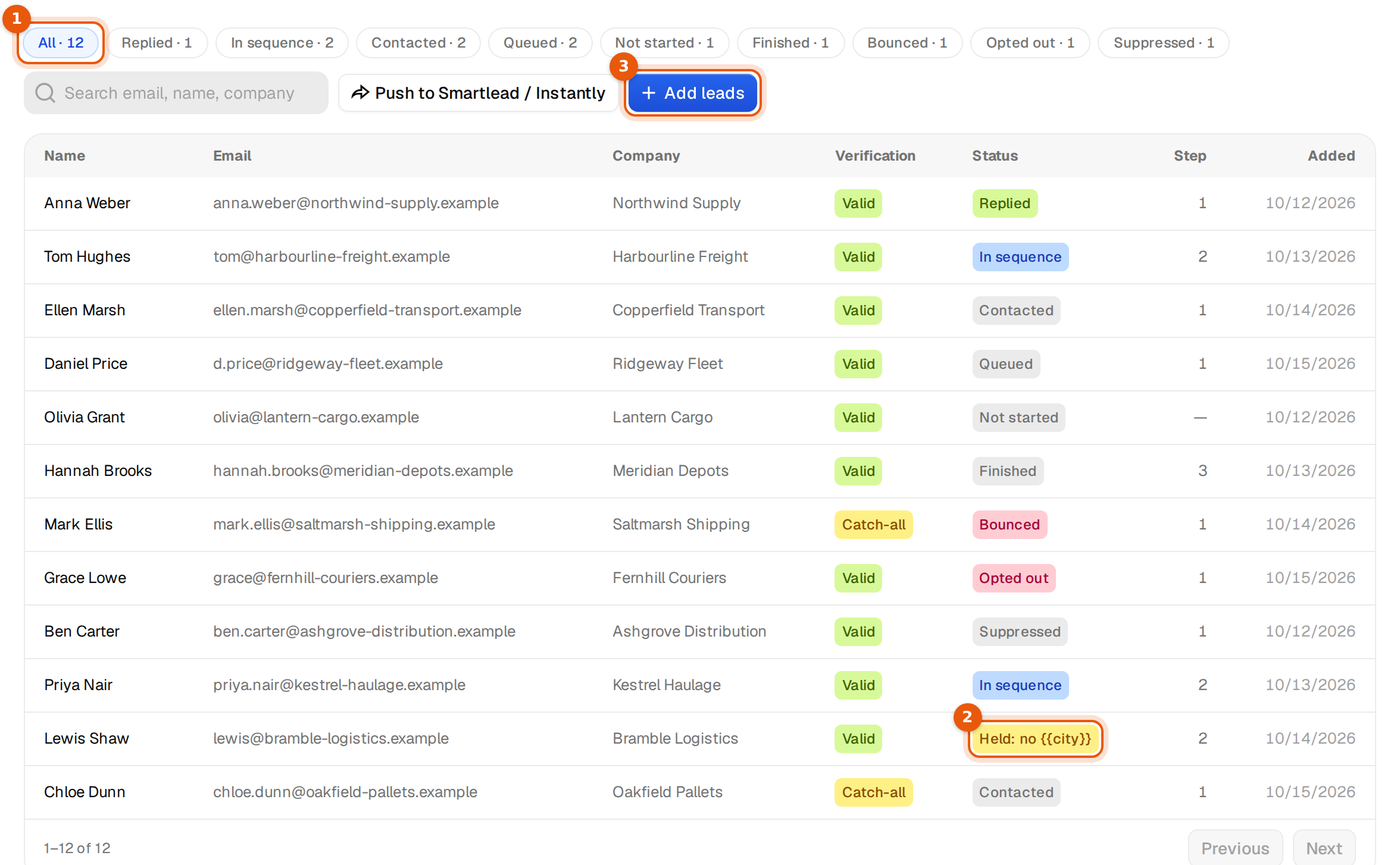
- Click a status chip at the top, for example Replied · 1, to see only those people. All shows everyone. Only statuses that occur in the campaign get a chip.
- Type in Search email, name, company to find one person.
- The Step column shows the email they are at. A dash means they have not started.
What each status means
| Status | What it means | More emails? |
|---|---|---|
| Not started | Added, but not scheduled yet. They start when the campaign launches or in the next sending window. | Yes |
| Queued | Scheduled for their next email. | Yes |
| In sequence | Has had at least one email and more are still to come. | Yes |
| Contacted | Has received at least one email. | Yes, if steps are left |
| Replied | Wrote back. No more emails from the main sequence. A subsequence may write to them. | No |
| Finished | Got every email in the sequence without replying. | No |
| Bounced | The address bounced. | No |
| Opted out | Asked to stop. Never contacted again from your workspace. | No |
| Suppressed | Stopped because of your block list, an earlier opt-out, or a reply or bounce in another campaign. | No |
| Paused | Waiting while the campaign is paused. | After you resume |
| Skipped | Left out, for example as a duplicate of someone already in the campaign. | No |
| Failed | The email could not be sent. Check the sending mailbox in Inboxes. | After the mailbox works again |
| Held: no {{x}} | Waiting at an email because a variable, for example {{city}}, has no value for this person. Hover the chip to see which email. | Once the value exists or you add a fallback |
| Held: broken variable | Waiting because the email has a variable that cannot be filled. Fix the email. | Once the email is fixed |
The Verification column
It shows the grade the address had when it joined: Valid, Catch-all, Unknown, Risky or Invalid, or Checking while the check is still running. Campaigns send only to addresses that passed. See Add leads to a campaign.
Held contacts
Argorant never sends an email with a gap where a name or city should be. When a value is missing, the contact waits at that email. The campaign page tells you how many, for example 37 contacts are held for a missing value, with the buttons Add a default in Emails and See held contacts.
To release them, give the variable a fallback, such as {{city|your area}}, and save. They continue in the next sending window. See Fallbacks.
Common questions
- Why is someone Suppressed who never heard from this campaign? They replied to, bounced in or opted out of another campaign of your workspace, or their address or domain is on your block list.
- Why do many people stay Not started after launch? The campaign sends a limited number per day. Check the daily limit and the number of senders. See Schedule and sending settings.
- Can I change a status by hand? No. Statuses follow what happens. To stop someone, use the block list.
Removing someone
To make sure someone is never emailed, add their address or domain to your block list in Settings, then Block list. They are stopped in every campaign.